A bad trail camera setup can waste weeks of scouting. I’d keep it simple: put cameras where deer are funneled, aim for side shots, clear the sensor path, test before I leave, and check cameras on a low-pressure schedule.
Here’s the full article in one short view:
- I start with site choice, because location decides photo quality and how much deer traffic I’ll see.
- I focus on pinch points, crossings, field edges, scrape lines, and water based on the time of season.
- I avoid spots that force me to walk through bedding or feeding cover.
- I mount the camera so deer pass across the frame, not straight at it.
- I check mode, trigger speed, battery level, date/time, and SD card space before leaving.
- I trim grass and brush to cut blank photos and false triggers.
- I run a walk test on-site, then fix aim, glare, low batteries, or card issues right away.
- I keep camera visits light, because extra human scent can change deer movement.
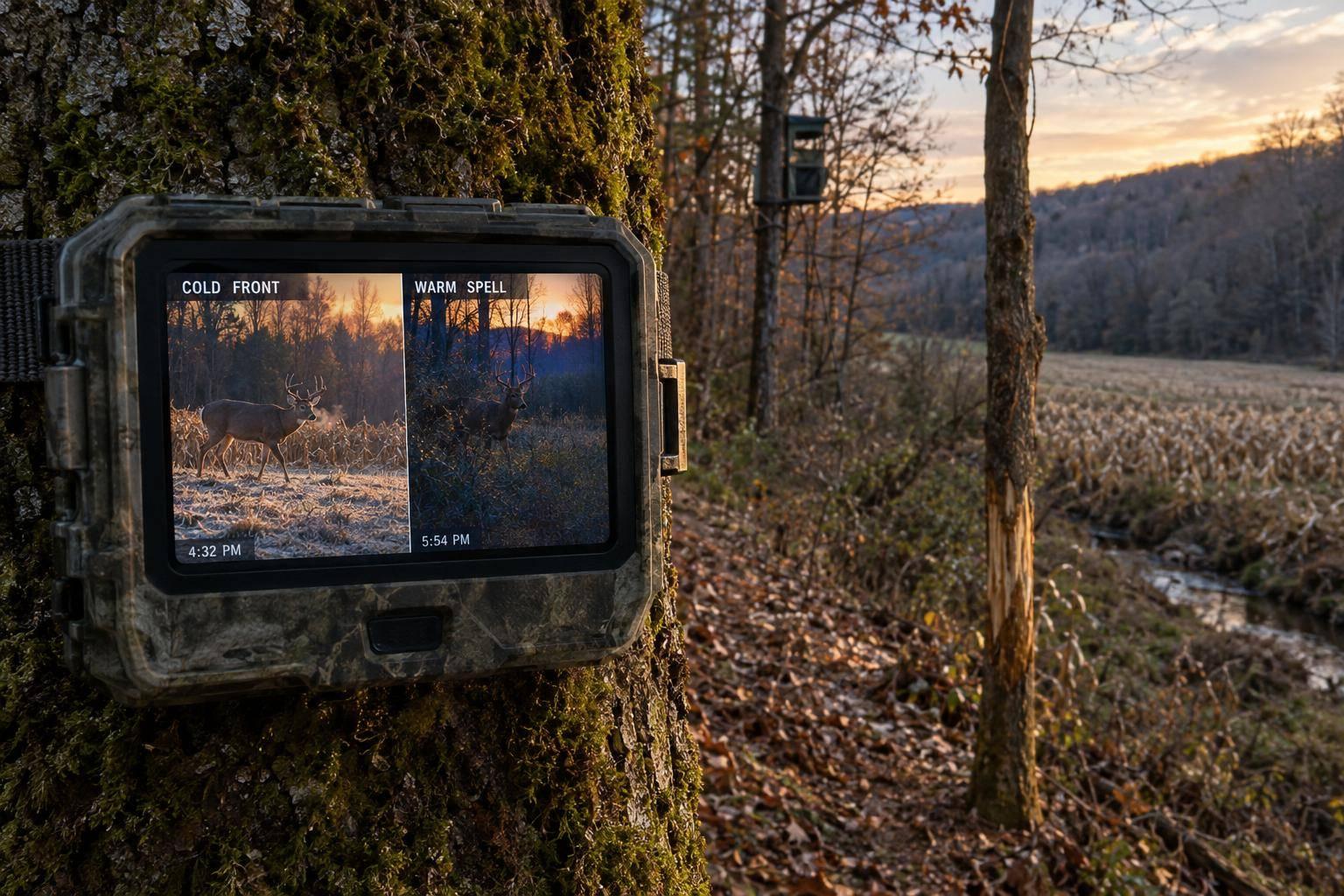
A few timing points matter too. The article notes that early September is a strong time for velvet buck photos, while late October through mid-November is better for scrape lines and timber funnels as rut sign builds. That means the same camera can do a different job just by moving it at the right time.
If I had to boil the whole checklist down to one line, it would be this: pick a high-traffic route, set the angle for clear side images, test the setup, and stay out of the area as much as possible.
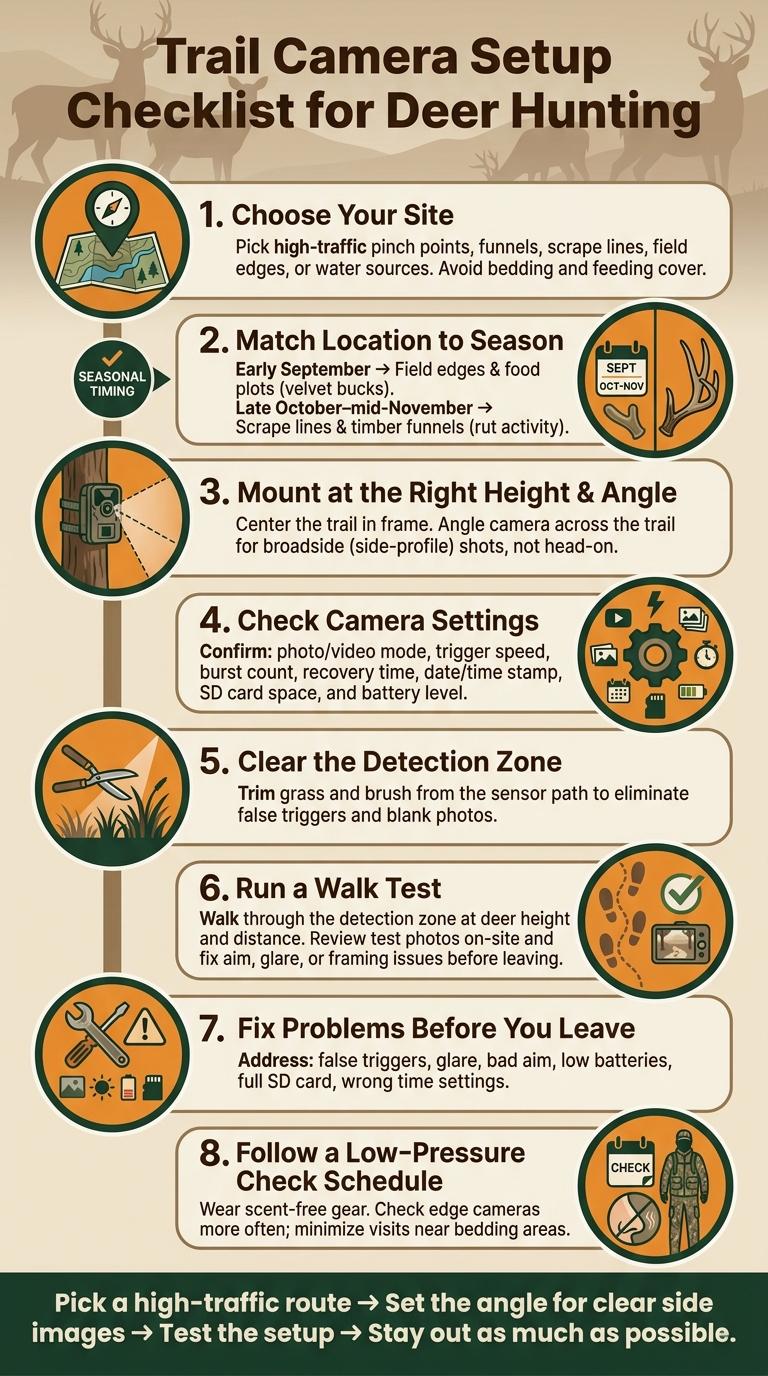
Trail Camera Setup Checklist for Deer Hunting
Trail Camera Tips Every Whitetail Hunter Needs to Know
Camera Site Selection
Before you hang a single camera, make sure the spot is worth it. A random trail can burn time and fill your card with junk. You want routes deer are forced to use.
Pick High-Odds Deer Movement Spots
Steep hills, ridges, hollows, and funnels tend to squeeze deer into more predictable travel paths. Focus on natural pinch points, like where two ridges come together or where a creek crossing narrows movement into one lane.
Season matters here. In early September, field edges and food plots tend to produce because bucks are still locked into feeding patterns. Early September is the best velvet-photo window. By late October through mid-November, move cameras to scrape lines and deep timber funnels, when rut activity builds around scrapes. Fresh tracks, scrapes, and crossings tell you deer are using that corridor right now.
Avoid Low-Value or High-Disturbance Locations
If getting to the camera means walking through bedding cover or feeding cover, that site can do more harm than good. On private land, check in with the landowner about their schedule. Farm work, timbering, or ATV traffic can wreck an otherwise good setup.
Look for human sign before you hang anything. Old tire ruts, spent shells, and worn footpaths near the area are warning signs. The better play is simple: fresh deer sign with no clear human pressure.
Trail, Scrape, Field Edge, and Water Setup Comparison
Each setup type does a different job. Use this table to line up your camera spot with the right season and goal.
| Setup Type | Best Season | Best Use | Main Drawback |
|---|---|---|---|
| Trail / Funnel | All season | Patterning daily travel between bedding and feeding | Fast movement can blur or miss shots |
| Scrape Line | Pre-rut / Rut | Identifying mature bucks and social hierarchy | Activity is highly seasonal and often nocturnal |
| Field Edge | Early season | Monitoring bachelor groups and feeding patterns | Distance can put deer outside the detection zone; cameras are easier to spot |
| Water / Creek | Early season / Late summer | Reliable stop-and-shoot location during hot, dry stretches | Flooding and thick cover can disrupt detection |
Once you pick the site type, the next step is matching camera height and angle to the travel path.
Mounting Height and Angle
Once you’ve picked the right trail, the next step is simple: get the height and angle right. This preparation is key when planning ultimate whitetail hunts in Kentucky on managed land.
Set the Camera at the Right Height
Mount the camera so the trail stays centered in the frame. You want the travel lane to stay open, with nothing blocking the shot.
Then tilt the camera so it catches deer moving broadside, not just passing through the edge of the frame.
Aim for Side-Profile Photos Instead of Head-On Shots
Set the camera at an angle across the trail to get side-profile photos. Those shots usually show more of the deer and make the image easier to read at a glance.
And here’s the small detail that matters: tighten the mount well so the angle doesn’t shift over time.
Camera Settings and Detection Check
Once the camera is in place, take a minute to make sure it can get clean, usable images. This is the last check before you head out, and it can save you from coming back to a card full of junk photos.
Confirm Photo, Video, Trigger, and Memory Settings
After the camera is mounted and aimed, check the settings before leaving. Go over photo or video mode, trigger speed, burst count, recovery time, date and time, SD card space, and battery level.
It sounds basic, but this is where small mistakes turn into lost footage. A camera in the wrong mode or a full SD card can ruin an otherwise good setup.
Clear the Detection Zone and Run a Walk Test
After the settings check, clear the sensor path and test the setup. Trim any brush or grass that could cause false triggers, then run a walk test at the same distance and angle deer will use.
Review the test photos on site to make sure the camera is covering the area you want. If the frame looks off now, it won’t fix itself later.
Fix Common Setup Problems Before You Leave
If anything looks off, fix it now. Check these before you leave:
| Problem | Quick Fix |
|---|---|
| False triggers | Clear brush or grass from the detection zone. |
| Glare or overexposure | Reposition the camera and test again. |
| Bad aim or missed frames | Re-aim the camera and rerun the walk test. |
| Low batteries | Replace the batteries before leaving. |
| Full card | Use a card with more capacity. |
| Wrong time settings | Reset the date and time stamp. |
Maintenance and Final Recheck
After mounting and testing, wrap up with a light maintenance check. The goal is simple: make sure the camera is clean, secure, and ready to sit undisturbed until your next visit.
Follow a Low-Pressure Camera Check Schedule
Your check schedule should match the spot.
Edge cameras can handle more frequent checks. Cameras near bedding areas need a gentler approach and fewer visits.
On every check, wear scent-free outerwear and waterproof boots. Small habits like that help you keep pressure down.
Final Leave-the-Site Checklist
After the walk test, leave the camera alone until the next planned check.
Before you head out, run through this last check:
- Lens and sensor: Wipe both clean, especially after rain or in dusty conditions.
- Mounting strap: Make sure it’s tight and secure so wind or animal contact doesn’t shift the camera.
- Battery level: Replace the batteries if they won’t last until your next planned check.
- SD card: Confirm it’s seated correctly, formatted, and has enough space to keep recording.
- Camera angle and detection zone: Confirm coverage and clear any new brush.
- Exit route: Leave by the same route, quietly.
FAQs
How many trail cameras do I need?
The number of trail cameras you need comes down to your scouting goals and the size of your hunting area.
For the best results at Whitetail Hunting Kentucky, set cameras near high-traffic food sources, active scrapes, and known travel corridors. That gives you a clearer read on buck movement without just guessing and hoping for the best.
Our expert guides can also help you spot strong camera locations based on local deer movement and current field conditions.
Should I use photo mode or video mode?
It comes down to what you want from your scouting. Photo mode is usually the better pick if you want longer time in the field, since it uses less battery and takes up less storage. That makes it a good fit for keeping tabs on local deer or following a specific buck over time.
Video mode shows you more. You can get a better look at deer behavior, movement patterns, and antler details. The tradeoff is simple: it burns through battery life and memory much faster. Because of that, a lot of hunters use photos to monitor general activity, then switch to video when they want a closer look at a target buck.
How often should I move a trail camera?
Move your trail camera based on deer activity you’re seeing over time. If you get real-time updates, pay close attention to shifts in a target buck’s movement and relocate your cameras when the pattern changes.
That keeps you locked in on deer movement without putting extra human pressure on the area. Whitetail Hunting Kentucky stresses careful planning and smart prep to help hunters get into the right spots.